
 CZ
 SK
 EN
 DE
 PL
 RU
SolaX app comparison: SolaX Cloud vs FVE SolaX Commander
Looking for a SolaX app for your solar installation? The best-known option is the official SolaX Cloud app, which provides monitoring and management over the internet. If you prefer reading data straight from the inverter, FVE SolaX Commander is a separate Windows application.
These are not interchangeable products. SolaX Cloud is the manufacturer’s solution for remote access. FVE SolaX Commander is independent software that communicates with supported SolaX inverters on your local network without a cloud server in the middle.
The official SolaX Cloud application
SolaX Cloud displays production, consumption, energy flows, battery information and historical data. You can use its mobile app or web interface to check your solar system from elsewhere.
How often does SolaX Cloud refresh its data?
In SolaX Cloud, some data update every 10 seconds, some every 5 minutes, and some every 15 minutes.
FVE SolaX Commander: direct inverter data without a cloud server
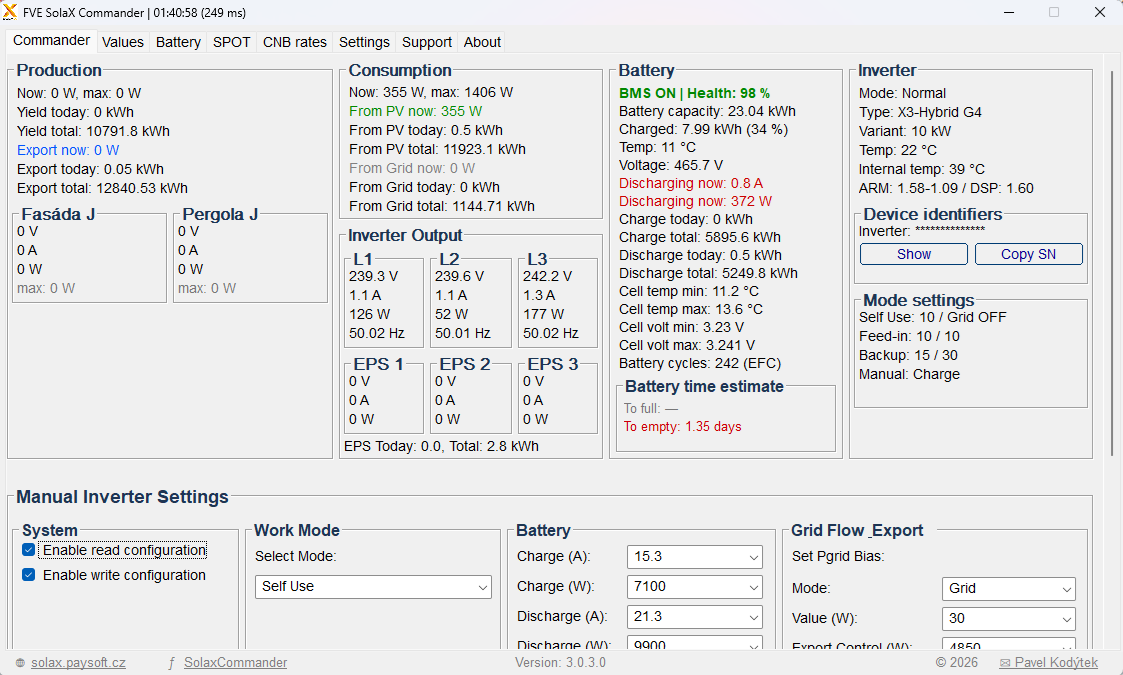
FVE SolaX Commander communicates with compatible SolaX inverters over Modbus TCP on the local network. Direct inverter communication does not require SolaX Cloud, internet access or a cloud account. An internet connection is only used for online features, such as checking whether a new program version exists. Planned features will also use it to retrieve spot electricity prices and CNB exchange rates.
How often does FVE SolaX Commander refresh its data?
FVE SolaX Commander obtains current data directly from the inverter virtually continuously. It polls important information every 2 seconds, and less important or slowly changing information every 10 seconds. Both intervals can be increased in the settings.
Monitoring, battery, diagnostics, spot prices and CNB exchange rates
The application displays electricity production and consumption, grid imports and exports, instantaneous power, individual phases and detailed battery information. Since version 3.0.1.0, it also estimates the time until the battery is empty or fully charged if the current average power remains unchanged. Alongside solar monitoring, it can display register values that help assess the inverter’s operating condition and identify discrepancies. The planned version 3.0.2.0 will add a spot electricity price overview to the FVE SolaX Commander application; version 3.0.3.0 is planned to add a CNB exchange-rate archive covering 1991 to the present.
Control supported SolaX inverters
FVE SolaX Commander is more than a dashboard. On supported models it can adjust selected operating parameters, such as working modes, battery charging and discharging or export limits.
SolaX Cloud vs FVE SolaX Commander: key differences
| Feature | SolaX Cloud app | FVE SolaX Commander app |
|---|---|---|
| Platform | Mobile app and web | Windows software |
| Data source | The communication dongle sends readings to SolaX Cloud servers, from which the app retrieves them. | Directly from the inverter over the home network |
| Internet for monitoring | Yes. The app retrieves operating data from SolaX cloud servers. | Not required for local inverter communication |
| Data refresh | Some data every 10 seconds, some every 5 minutes, and some every 15 minutes. | Important data every 2 seconds, other data every 10 seconds; intervals can be increased. |
| Remote access | Yes, via manufacturer cloud | Primarily local; remote access requires your own setup |
| Detailed readings | Depending on model and interface | Detailed inverter and battery readings where supported |
| Settings | Some service parameters are intended for qualified specialists; without an administrator password, controls are very limited. | Direct control offers broad technical possibilities. The app currently exposes only the most useful, safe and essential settings by design; more detailed options are planned. |
What do you need to run FVE SolaX Commander?
A Windows PC, a supported SolaX inverter and a local network. No conventional installer is required: download the RAR archive, extract it and start the application. On first launch, the application finds your inverter on the local network automatically.
Which SolaX application should you choose?
Both! SolaX Cloud is convenient for checking your solar installation remotely, for example on a phone. FVE SolaX Commander provides detailed local monitoring and direct inverter control from a Windows computer without relying on the cloud. The applications complement each other and can be used at the same time.
FVE SolaX Commander is independent software and is not an official SolaX manufacturer application.